Dr. Jorge Morales is an orthopedic surgeon. He needed a website where patients could find his contact info, see his specialty, and get a sense of who he is before booking. No booking system, no blog, nothing dynamic.
I started with Next.js. About two days in I stopped and asked myself why.
The stack switch
Next.js is a great framework for apps that need server rendering, API routes, and frequent updates. None of that applied here. I was building a static brochure and treating it like a web app.
Switched to Astro. Static by default, ships zero JavaScript unless you add it, and the build output is just HTML and CSS. For a site that changes maybe twice a year, that’s a better fit.
The Instagram problem
The doctor is active on Instagram so the original plan was to embed his feed on the site. The embed worked fine. It also loaded Instagram’s JavaScript on every visit, made several third-party requests on load, and made part of the page dependent on Meta’s infrastructure.
I didn’t benchmark before removing it but Instagram embeds are well-documented performance killers. We replaced it with screenshots of recent posts and a direct link to his profile. The visitor still sees his content, the site stops depending on an external service to load.
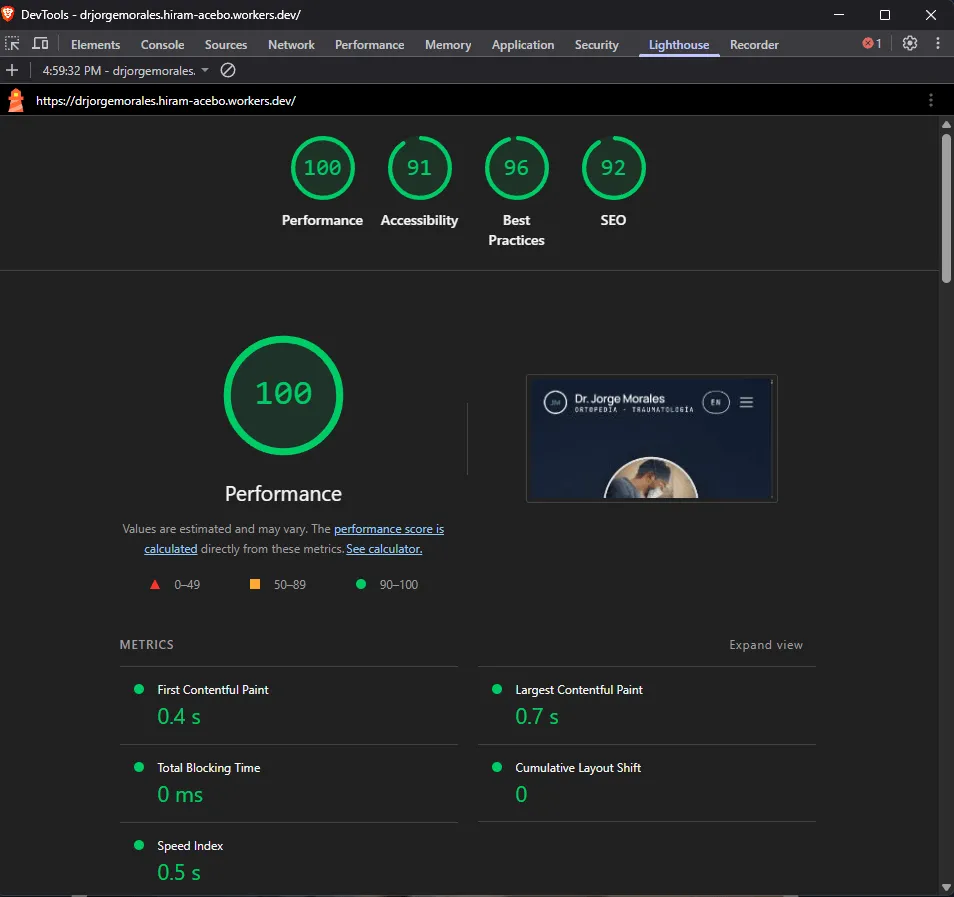
Lighthouse after: 100 performance, FCP 0.4s, LCP 0.7s.
Analytics without the cookie banner
Google Analytics was never on the table. Adding it means cookie consent banners, GDPR questions, and explaining to a doctor why his website is sending visitor data to an ad platform.
We went with Cloudflare Analytics for basic traffic — built into the hosting, no extra script, no personal data collected. For event tracking we added Umami, also cookieless. The client gets useful numbers without the legal headache or the banner asking patients to accept cookies before they can read a phone number.
Contact form
The site has a contact form. Cloudflare Turnstile handles bot detection — no checkbox captchas, runs in the background — with rate limiting on the endpoint.
Hosting
The site runs on Cloudflare Pages. For a static site this size it’s essentially free, just the cost of the domain. I’ll recommend the doctor registers his own domain on Cloudflare when we go live.
The domain will be in his name, the repository is his, the hosting account is his. If he ever wants to work with someone else he can, without anything breaking or anyone holding files hostage. I charge for the work, not for the dependency.